
What dental lab software solves
In a lab without a shared system, information lives in too many places: paper forms, the delivery notebook, an Excel sheet, messages on the phone. Every call from a dentist (“is the case ready?”) means a search. A forgotten try-in or an unrecorded payment only gets noticed when it’s too late.
Management software puts all of this into a single record the whole team can access. The result: you always know what has to be delivered, who is working on what and how much money you are owed.
What IQ Dental Hub does, module by module
1. The digital order form
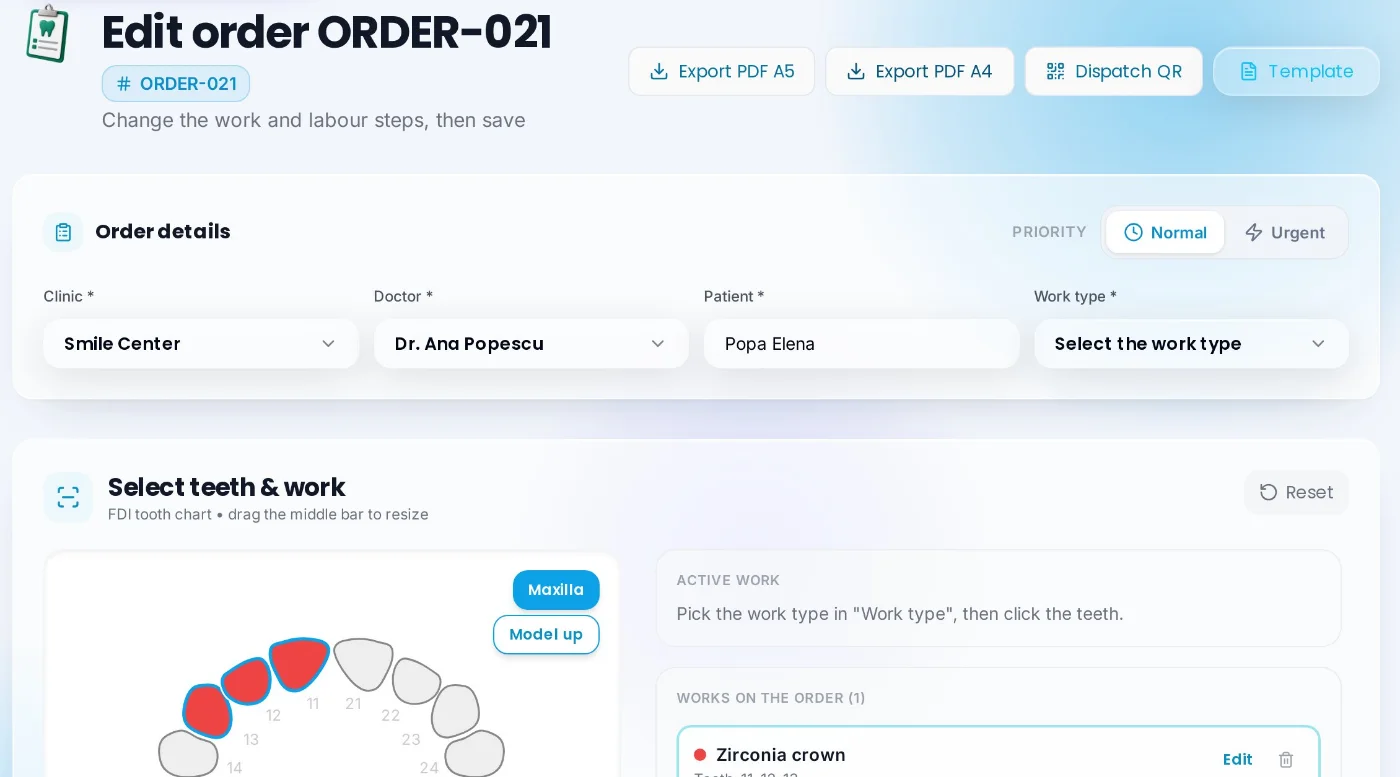
Every case starts from a complete order: clinic, dentist, patient, deadline and works. Teeth are picked right on the dental chart, the shade is chosen per arch, and the price is calculated automatically from your price list, including the prices negotiated with each clinic. Scheduled try-ins appear in the calendar automatically. The order can be printed or sent as a PDF.
2. Deadlines, try-ins and deliveries
See deliveries for the next 7 days, day by day, and scheduled try-ins in the calendar. On the delivery date the order moves to “Completed” automatically, and the status can be changed manually at any time. Cases close to their deadline are visible early.
3. The team and their tasks
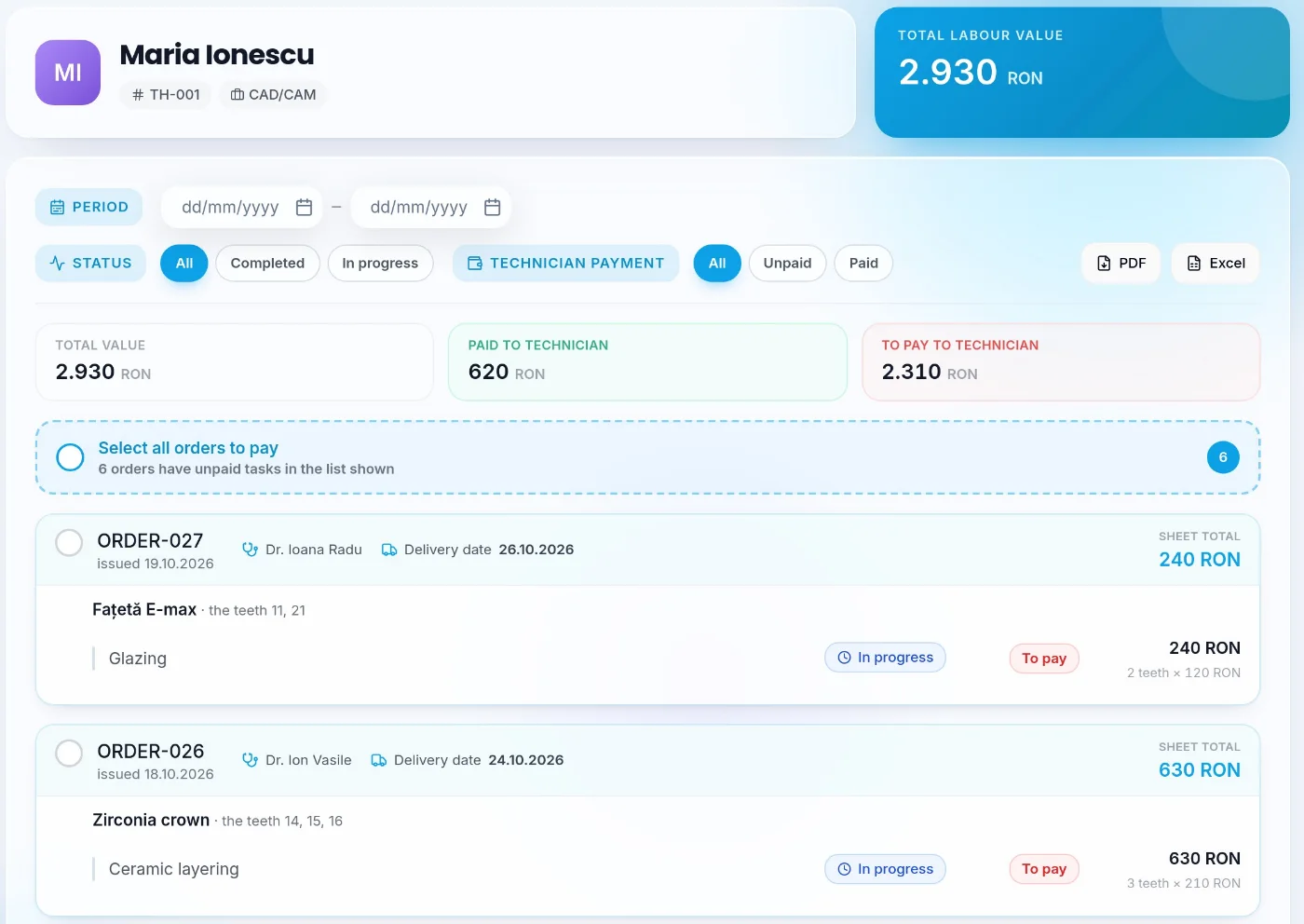
Works are split into tasks (for example scanning, CAD design, milling, layering), and each task is assigned to a technician. Each technician sees their own tasks and what they are owed for the work done. From the Admin Panel you decide which pages each user can see.
4. Payments and outstanding balances
You record full and partial payments, and the app calculates each clinic’s balance from orders and payments. Partial payments stay on record until paid in full, so you always see who owes you and how much. For each clinic you can generate a price offer as a PDF.
5. Reports
Monthly reports show works, payments and the team’s output for the chosen period and can be exported to PDF and Excel, for accounting or for your own analysis.
6. The free portal for dentists
Partner dentists create a free account with the lab code and see only their own orders: the status of each case, the delivery date, scheduled try-ins, payments and balance. That cuts down on “is it ready?” calls, and the lab controls what each dentist sees.
What the dentist sees in their account
7. Messages on every order
The lab and the dentist talk directly on the order, with photos attached. Messages stay next to the case they refer to, not scattered across private chats on the phone.
8. IQ Bot, the smart assistant
You type the question in your own words (“what do I have to deliver tomorrow?”, “how much are we owed?”, “which orders are late?”), and IQ Bot answers from the lab’s data. Each user only gets answers about what concerns them: technicians about their tasks, dentists about their orders.
9. And, in the same account
- Partner suppliers of materials and equipment, in one place.
- Professional information: technical explanations, protocols and work guides written for the lab.
- Community: questions between professionals, with photos and solutions marked as solved.
- Your lab’s logo in the app, step-by-step guides included, Romanian and English.
Which labs it suits
The small lab (1–3 people)
Replaces the notebook and the Excel sheet. Deadlines, try-ins and payments live in the same record, so you no longer have to remember everything yourself.
The lab with a team
Each technician sees their tasks, you see everything. Tasks and team pay are calculated from the recorded work.
The lab with many dentists
Different prices per clinic, separate balances and a portal for each dentist. Fewer calls, fewer misunderstandings.
The digital lab (CAD/CAM)
Scanning, design and milling stages become tasks tracked per technician, with photos and messages right on the order.
How to get started
- Create your account with email and password. At the first sign-in you add the company details and get your lab code.
- Set up your price list and team: clinics, dentists, technicians and works with your prices. You do it once.
- Invite dentists and get to work: dentists join with your code, and orders, tasks and payments go into the same record.
Frequently asked questions
How much does IQ Dental Hub cost?
The lab pays an annual subscription with full access to every module and every update. You can pay in full or in two or four instalments a year. You get the price offer directly from us, on request, with no obligation. Partner dentists never pay.
Can I try it before paying?
Yes. You get 30 free days with every feature, no card required. If you don’t activate the subscription, access stops and your data stays saved.
Do I need to install anything?
No. The app runs in the browser on a computer, tablet or phone. On a phone you can add it to the home screen like a regular app.
Can I bring my own list of works and prices?
Yes. Works, tasks and prices are added from the Admin Panel, and if you already have them in an Excel file, we help you import them.
Do dentists have to use the app too?
It’s not required. The lab can use the app on its own. Dentists who want to create a free account with the lab code and see the status of their cases.
Is the app available in English?
Yes. Each user picks their language: Romanian or English.